
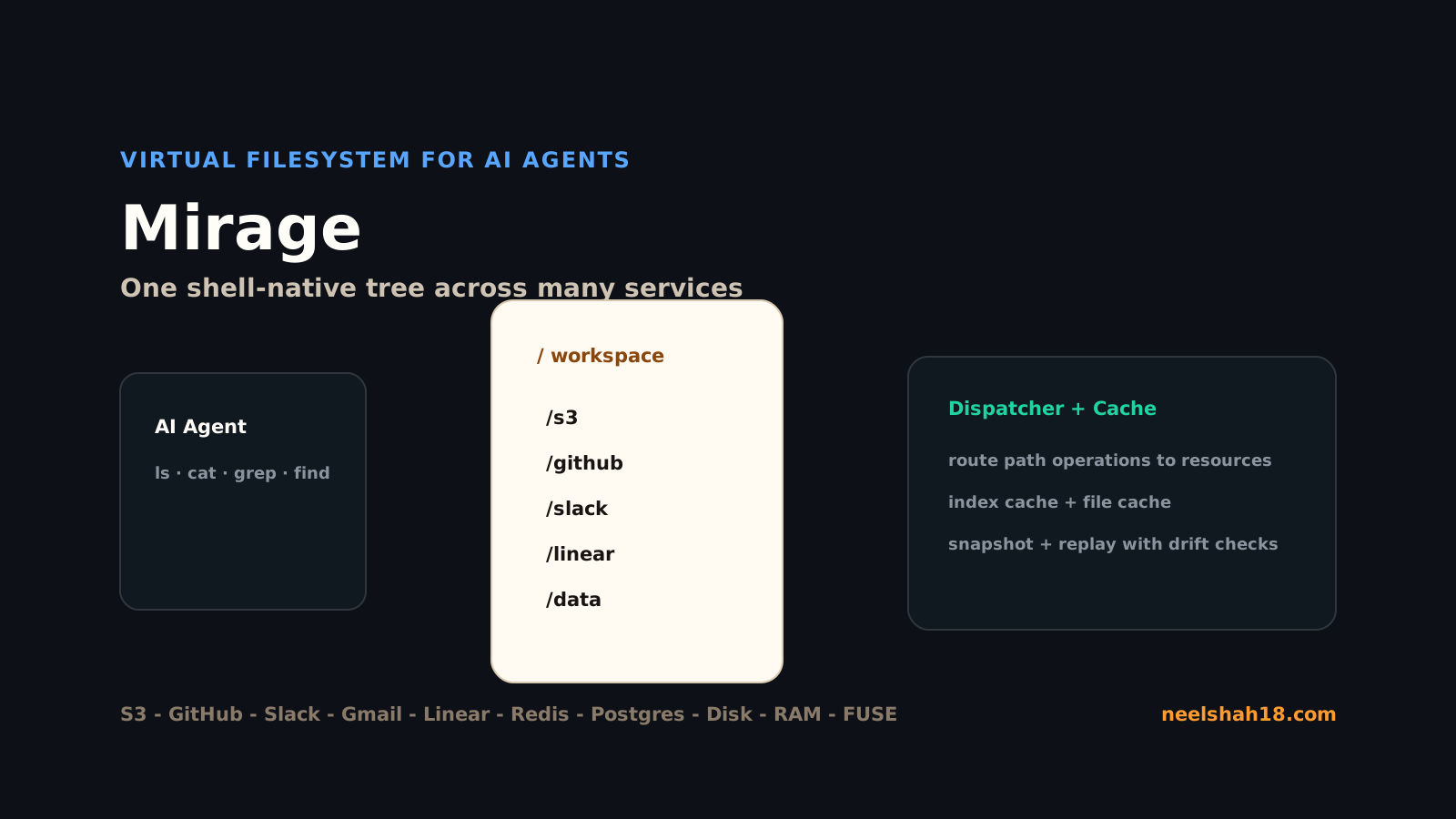
Mirage is a unified virtual filesystem for AI agents. Instead of giving an agent a different API or MCP tool for every service, Mirage mounts resources into one filesystem tree: /s3, /github, /slack, /gmail, /linear, /redis, /postgres, /data, and so on.
That sounds small until you think like an LLM. Models already understand shell workflows. They know ls, cat, grep, find, pipes, globs, redirects, and file paths. Mirage tries to turn that existing skill into a cross-service operating model.
This is my learning guide for Mirage. I am not trying to memorize every adapter. I want to understand the core idea well enough to decide when to use it in agent workflows:
- When should I mount a service instead of exposing it as a custom tool?
- How do I build a workspace?
- What does the shell actually execute?
- How do cache, provision, snapshot, and replay work?
- What are the runtime limitations in Python, Node, browser, and FUSE mode?
Sources used while writing: Mirage GitHub, Mirage docs index, introduction, installation, CLI, architecture, shell, resource matrix, snapshot and replay, Python install, and TypeScript limitations.
The problem Mirage solves
Agent systems often grow sideways.
You start with a model and a few tools. Then you add GitHub. Then S3. Then Slack. Then Linear. Then Gmail. Then a database. Each service gets a custom schema, permissions model, paging behavior, output format, search function, and error vocabulary.
The agent has to learn a new interface every time.
Mirage takes the opposite direction: make different resources look like one filesystem.
/
├── data/       # RAM or local disk
├── s3/         # object storage
├── github/     # repositories, files, issues
├── slack/      # channels and messages
├── linear/     # issues and projects
├── postgres/   # database resources
└── redis/      # key-value data
The agent can now run commands that look familiar:
ls /github/my-org/my-repo
grep -r "timeout" /slack/engineering /github/my-org/my-repo
cat /s3/logs/app.jsonl | wc -l
find /linear -name "*incident*"
cp /github/my-org/my-repo/README.md /data/readme-copy.md
The filesystem is the API.
Install options
Mirage has three main entry points: Python, TypeScript, and CLI.
Python:
uv add mirage-ai
# or
pip install mirage-ai
Optional extras install specific resource support:
pip install "mirage-ai[s3]"
pip install "mirage-ai[redis]"
pip install "mirage-ai[fuse]"
TypeScript:
pnpm add @struktoai/mirage-node
pnpm add @struktoai/mirage-browser
pnpm add @struktoai/mirage-agents
CLI:
curl -fsSL https://strukto.ai/mirage/install.sh | sh
# or
npm install -g @struktoai/mirage-cli
# or
uvx mirage-ai
Prerequisites:
- Python 3.12+ for the Python package and CLI path.
- Node.js 20+ for the TypeScript SDK.
- macOS or Linux for FUSE mounting.
My recommendation: learn Mirage without FUSE first. Use the in-process Workspace API and shell execution. Add FUSE only when host tools or editors need to see the Mirage tree as a real mounted filesystem.
First workspace: RAM only
The smallest useful Mirage workspace is an in-memory filesystem.
from mirage import Workspace
from mirage.resources import RAMResource

ws = Workspace({
    "/data": RAMResource(),
})

ws.execute("echo hello > /data/hello.txt")
result = ws.execute("cat /data/hello.txt")
print(result.stdout)
This teaches the model:
- a
Workspaceowns mounted resources; - a mount path maps to a resource;
execute()runs Mirage shell commands;- output comes back as stdout/stderr/result metadata.
The shell is not raw /bin/bash. Mirage parses a bash-like command language with tree-sitter and executes it through its own VFS-aware runtime. That is important for safety and portability, but it also means shell support is broad rather than complete.
Unsupported or limited shell features include things such as bg, disown, exec, complete, compgen, ulimit, and output process substitution like >(cmd).
Adding real mounts
Once RAM works, add one external mount.
Example shape:
from mirage import Workspace
from mirage.resources import RAMResource, S3Resource, GitHubResource

ws = Workspace({
    "/data": RAMResource(),
    "/s3": S3Resource(bucket="my-bucket"),
    "/github": GitHubResource(token="...", owner="my-org"),
})

ws.execute('grep -r "retry" /github/my-repo/src > /data/retry-notes.txt')
ws.execute('cp /data/retry-notes.txt /s3/reports/retry-notes.txt')
The exact constructor arguments depend on the resource, but the mental model remains stable: resource config lives at mount time, and the agent uses paths after that.
Mounts can expose different modes:
read: agent can inspect the resource.write: agent can create or modify files/objects.exec: agent can execute supported operations where the resource allows it.
For agents, I would default to read-only mounts and make writable mounts explicit. Mirage simplifies access, so permission boundaries matter even more.
CLI workflow with YAML
The CLI path is useful when you want reproducible workspaces outside application code.
A workspace config might look like this:
mounts:
  /data:
    type: ram
  /repo:
    type: disk
    path: .
  /s3:
    type: s3
    bucket: my-bucket
Then:
mirage workspace create demo -f workspace.yaml
mirage exec demo 'find /repo -name "*.md" | head'
mirage exec demo 'grep -r "Mirage" /repo /s3'
The CLI uses a local daemon over HTTP. It can auto-spawn when you create or use a workspace and exit after an idle timeout. That keeps the CLI fast without forcing you to manage a long-running process manually.
Provision before expensive reads
One of Mirage’s strongest ideas is provision: estimate cost before running a command.
If a command may read a large S3 prefix, scan Slack history, or fetch many GitHub files, you do not want an agent blindly pulling everything. Provisioning can estimate network bytes, cache hits, and likely cost before execution.
Conceptually:
mirage provision demo 'grep -r "timeout" /s3/logs /slack/engineering'
Then decide:
- run it as-is;
- narrow the path;
- add a time window;
- preload cache;
- ask a human before reading the expensive source.
This is where Mirage becomes more than “filesystem syntax.” It gives agent workflows a planning step before data movement.
Cache behavior
Mirage has two major cache concepts:
- Index cache for listings and metadata.
- File cache for object bytes.
Example:
- First
ls /s3/logscalls the remote API and fills the index cache. - Second
find /s3/logs -name "*.jsonl"can reuse listing metadata. - First
cat /s3/logs/app.jsonldownloads object bytes. - Second
grep ERROR /s3/logs/app.jsonlcan reuse the file cache.
Click to simulate repeated remote reads.
Snapshot and replay
Snapshot/replay is the feature I would use for serious agent debugging.
An agent run is hard to reproduce because external services drift. Slack messages change, GitHub branches move, S3 objects get overwritten, and API results depend on time.
Mirage snapshots can capture:
- mount configuration;
- sessions;
- command history;
- finished jobs;
- cache bytes;
- fingerprints for remote reads.
Example:
mirage workspace snapshot demo /tmp/demo.tar
mirage workspace load /tmp/demo.tar --id demo_loaded --override workspace.yaml
Credentials are redacted, so you must supply cloud credentials again on restore. That is the correct default.
Important caveat: snapshot fidelity depends on resource support. Some live services such as Gmail, Slack, Linear, or Notion may not preserve full live state. Only touched/read paths are fingerprinted. Revision pinning depends on backend support and retention policies.
So the right mental model is not “time machine for every SaaS.” It is “reproducible enough for the data the agent actually touched, with drift detection where Mirage can fingerprint the upstream source.”
Architecture
Mirage has a clean four-layer shape:
- Agent or application issues shell commands, VFS calls, or syscalls.
- Mirage Bash + VFS parses commands and exposes a filesystem API.
- Dispatcher + cache routes each path to its owning mount and avoids repeated remote reads.
- Remote resources provide actual data: RAM, disk, S3, GitHub, Slack, Google Workspace, databases, Redis, SSH, and others.
AI agent / app
      |
      v
Mirage shell + VFS
      |
      v
Dispatcher + cache
      |
      +-- /data    -> RAM / disk
      +-- /s3      -> object storage
      +-- /github  -> GitHub API
      +-- /slack   -> Slack API
      +-- /redis   -> Redis
      +-- /postgres-> Postgres
FUSE is optional. Without FUSE, Mirage runs in-process. With FUSE, the host OS sees the Mirage workspace as a mounted filesystem. That can be powerful, but it also brings OS-level filesystem constraints.
Python vs Node vs Browser
Runtime matters.
Python is the most natural starting point if you are building agent workflows in Python and want server-side resource access.
Node works well for TypeScript agent runtimes, but the docs call out important constraints:
- Same-process FUSE plus native exec can deadlock, so Mirage throws early.
fs-monkeypatches CommonJSrequire("fs"), not ESMnode:fs.- FUSE reads from API-backed resources with unknown size can cap at 100 MiB in Node.
Browser TypeScript has a different constraint set:
- no FUSE;
- no native subprocess execution;
- HTTP-backed resources need CORS, PKCE, presigned URLs, or same-origin proxying;
- OPFS storage is quota-limited and may be evicted unless persistence is requested;
- SSH, Postgres, MongoDB, email, and FUSE peers are Node-only.
The takeaway: choose runtime first, then choose resources. Do not assume every mount behaves identically in every environment.
Agent design patterns
Incident review
Mount Slack, GitHub, and a RAM workspace:
grep -r "payment timeout" /slack/engineering > /data/slack-context.txt
grep -r "timeout" /github/company/api/src > /data/code-context.txt
cat /data/slack-context.txt /data/code-context.txt > /data/incident-brief.md
Then the agent can summarize from a single local file.
Documentation audit
Mount GitHub and Google Drive:
find /github/company/docs -name "*.md" > /data/repo-docs.txt
find /gdrive/ProductDocs -name "*.gdoc.json" > /data/drive-docs.txt
grep -r "deprecated" /github/company/docs /gdrive/ProductDocs
Data handoff
Mount S3 and local RAM:
cat /s3/events/2026-05-15.jsonl | grep checkout > /data/checkout-events.jsonl
wc -l /data/checkout-events.jsonl
Cross-resource agent workflow
The useful pattern is not one command. It is a sequence:
- Search Slack for incident context.
- Inspect GitHub files touched by related commits.
- Write a summary to
/data. - Create or update a Linear issue through the mounted resource.
- Snapshot the workspace so the run can be audited.
Mirage vs MCP tools vs direct APIs
Use Mirage when:
- the agent needs to explore many resources with the same mental model;
- shell-style search, copy, grep, and pipelines are natural;
- you want cache, provision, and snapshot/replay behavior;
- you want the agent to produce intermediate files;
- you want to reduce custom tool schema sprawl.
Use direct APIs or dedicated MCP tools when:
- the operation is highly structured and transactional;
- the backend has business rules that do not map cleanly to files;
- you need narrow, auditable actions such as “create invoice” or “approve deployment”;
- you do not want broad filesystem-like read access.
Use a sandbox when:
- you run untrusted code;
- you need process isolation;
- you need network or filesystem containment outside Mirage’s VFS.
Mirage is not a full OS sandbox. It restricts what the Mirage shell sees, but untrusted code still belongs in a real sandbox such as E2B, Daytona, Modal, or another isolated runtime.
My practical learning path
This is how I would learn Mirage without getting lost:
- Create a RAM-only workspace.
- Write and read a file with
echo,cat, andls. - Add a local disk mount.
- Add one cloud resource, preferably S3 or GitHub.
- Use
grep,find, pipes, and redirects across two mounts. - Use
provisionbefore a command that could read lots of data. - Snapshot the workspace and restore it.
- Add Slack, Linear, Gmail, or another SaaS resource only after the basic workflow feels natural.
- Try FUSE last.
The core skill is not “memorize every Mirage adapter.” The core skill is thinking in paths:
What should the agent be allowed to read?
Where should it write intermediate work?
Which remote data should be cached?
Which command should be provisioned before execution?
Which run needs a snapshot?
If you answer those questions well, Mirage becomes a serious abstraction for AI agents: one filesystem over many services, with enough control to keep complex workflows understandable.