
Most AI assistants start fresh every session. You explain your project stack again, paste in the same context, re-specify the constraints you have already described a dozen times. The model has no memory of you. It cannot help you more efficiently today than it did six months ago.
OpenHuman is trying to solve a different problem: how does a personal AI agent accumulate structured, queryable knowledge about you — from your actual tools (Gmail, Slack, GitHub, Notion) — without requiring you to build any pipeline, manage any API keys beyond one OAuth flow, or hand your data to a cloud service?
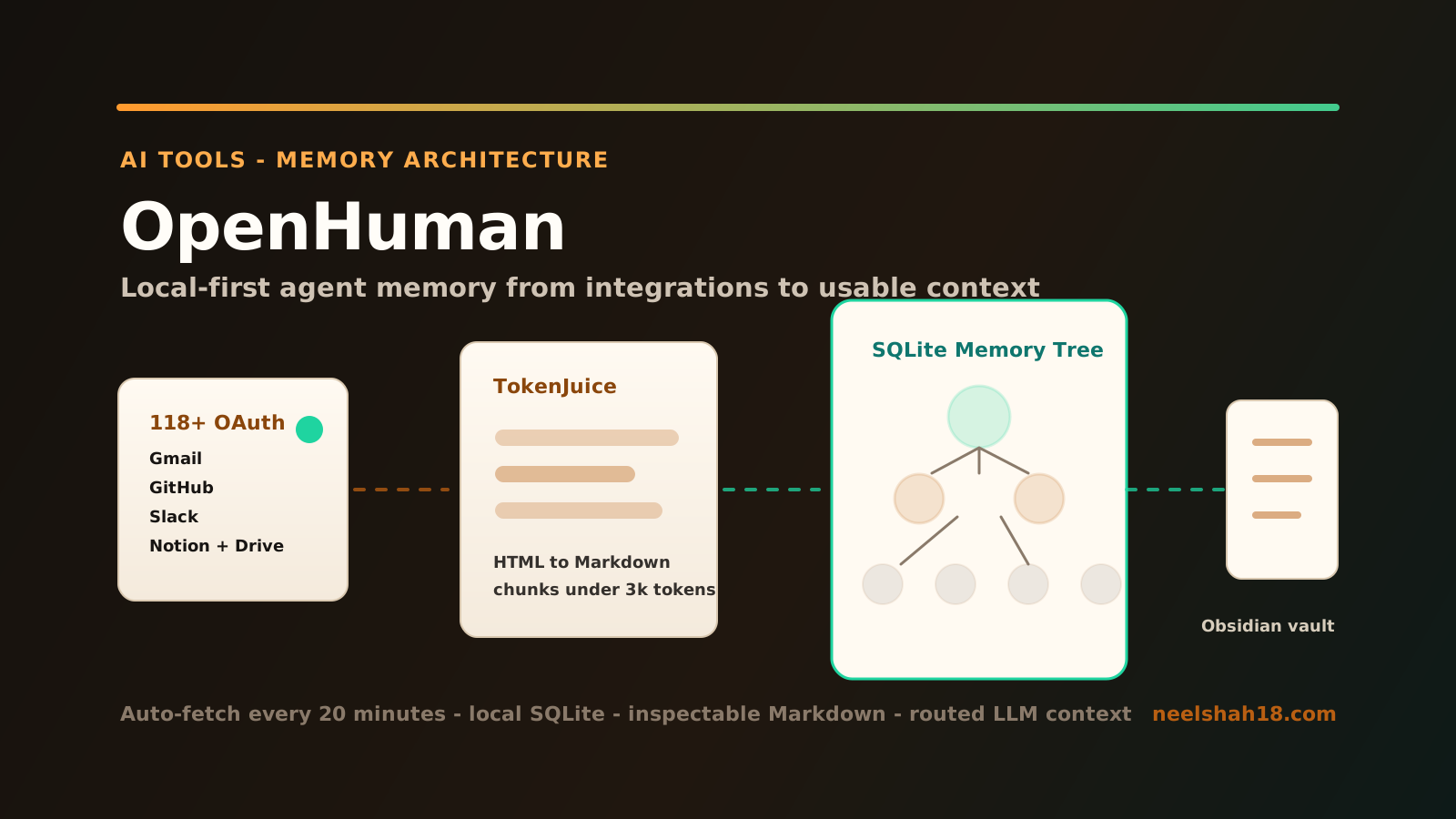
The answer involves a persistent memory tree, a compression layer called TokenJuice, an auto-fetch loop that runs every 20 minutes, and a local SQLite store that also syncs to an Obsidian-compatible vault. That combination is technically different from what most agent harnesses are doing, and it is worth examining closely.
Project status: Early Beta. 7,500+ GitHub stars. Written in Rust (Tauri) for the desktop shell, with a web UI layer and SQLite for local storage. The rough edges are real — this is not production-grade software yet — but the architecture is coherent.
The Memory Architecture
The central design decision in OpenHuman is inspired by Andrej Karpathy’s LLM Knowledgebase pattern: rather than storing raw data or relying on ad-hoc RAG over unstructured blobs, the system canonicalizes everything into small, scored, hierarchical Markdown chunks — then builds a tree of summaries over them.
The full pipeline looks like this:
┌─────────────────────────────────────────────────────────────────────────────┐
│                     OpenHuman Memory Tree Pipeline                          │
└─────────────────────────────────────────────────────────────────────────────┘

  OAuth Sources (118+)
  ┌──────────┐  ┌──────────┐  ┌──────────┐  ┌──────────┐  ┌──────────┐
  │  Gmail   │  │  Slack   │  │  GitHub  │  │  Notion  │  │  Drive   │  ...
  └────┬─────┘  └────┬─────┘  └────┬─────┘  └────┬─────┘  └────┬─────┘
       │              │              │              │              │
       └──────────────┴──────────────┴──────────────┴──────────────┘
                                     │
                            ┌────────▼────────┐
                            │  Auto-Fetch Loop │
                            │  every 20 min   │
                            │  per connection │
                            └────────┬────────┘
                                     │
                            ┌────────▼────────┐
                            │   Raw Data       │
                            │  (HTML, JSON,    │
                            │   email bodies,  │
                            │   API payloads)  │
                            └────────┬────────┘
                                     │
                            ┌────────▼─────────────────────────────┐
                            │           TokenJuice Layer            │
                            │  HTML → Markdown                      │
                            │  URL shortening                       │
                            │  non-ASCII removal                    │
                            │  deduplication + summarization        │
                            │  target: ≤ 3,000 tokens per chunk     │
                            └────────┬─────────────────────────────┘
                                     │
                       ┌─────────────▼─────────────┐
                       │    SQLite Memory Tree       │
                       │  ┌─────────────────────┐   │
                       │  │  Summary node (L3)  │   │
                       │  │  ┌───────────────┐  │   │
                       │  │  │ Summary (L2)  │  │   │
                       │  │  │ ┌───────────┐ │  │   │
                       │  │  │ │ Chunk(L1) │ │  │   │  ← scored, timestamped
                       │  │  │ │ Chunk(L1) │ │  │   │
                       │  │  │ └───────────┘ │  │   │
                       │  │  └───────────────┘  │   │
                       │  └─────────────────────┘   │
                       │  (all stored locally)       │
                       └─────────────┬───────────────┘
                                     │
                       ┌─────────────▼───────────────┐
                       │  Obsidian-Compatible Vault   │
                       │  same chunks as .md files    │
                       │  linkable, searchable,       │
                       │  inspectable by you          │
                       └─────────────┬───────────────┘
                                     │
                       ┌─────────────▼───────────────┐
                       │  Agent Context Window        │
                       │  relevant chunks retrieved   │
                       │  and injected at query time  │
                       └─────────────────────────────┘
A few things make this architecture notable.
First, the chunk ceiling. Every piece of data that enters the system is compressed until it fits in ≤3,000 tokens. This is a hard constraint, not a best-effort target. It means the memory tree stays token-efficient as it grows — you are not accidentally injecting a 15k-token email thread into a context window.
Second, the tree structure. Rather than flat vector chunks retrieved by cosine similarity, OpenHuman builds hierarchical summary nodes over the raw chunks. The agent can retrieve at different levels of granularity depending on what the task requires. A high-level question about your project gets a summary node. A detailed lookup gets the raw leaf chunk.
Third, the Obsidian vault mirror. Every chunk that lands in SQLite also lands as a .md file in a local Obsidian-compatible directory. This is practically useful: you can open the vault in Obsidian and browse what the agent knows about you. You can see the exact text that will be injected into context. You can delete or edit it. That observability matters in a system that is continuously ingesting your data.
Integrations and Auto-Fetch
OpenHuman ships with 118+ OAuth integrations. The list covers what most knowledge workers actually use: Gmail, Google Calendar, Google Drive, GitHub, Slack, Notion, Linear, Jira, Stripe, and more. Each integration uses a one-click OAuth flow — you authorize once and the system handles credential storage locally.
The interesting part is the auto-fetch loop. Every 20 minutes, OpenHuman walks each active connection and pulls fresh data into the memory tree automatically. There is no scheduler to configure, no webhook to wire up, and no polling script to maintain. The ingestion is continuous and background by default.
This is architecturally different from agents that treat integrations as tools the model can call on demand. In the on-demand model, the agent only knows what it explicitly fetches in a given session. In OpenHuman’s model, the agent’s memory is continuously updated regardless of whether you are actively using it. By the time you ask a question, the relevant data may already be in the memory tree.
The practical implication: the agent can answer questions about things that happened yesterday in your Gmail thread or your Slack channel without needing to go fetch them live at query time. The memory tree already has that data, compressed and indexed.
TokenJuice: What the Compression Layer Actually Does
The name is marketing-adjacent but the technical implementation is straightforward. TokenJuice is a preprocessing pipeline that runs on every piece of raw data before it touches an LLM. The operations, in order:
-
HTML to Markdown conversion — web pages and email bodies arrive as HTML. TokenJuice strips tags, converts structure (headings, lists, tables) to Markdown equivalents, and discards presentational noise. A typical email thread shrinks by 40–60% at this step alone.
-
URL shortening — full URLs are often long and token-wasteful. They get replaced with short references or stripped if they are not semantically meaningful.
-
Non-ASCII removal — emoji, special characters, and encoding artifacts are stripped. This is aggressive but appropriate for a system trying to maximize information density per token.
-
Deduplication — repeated boilerplate (email signatures, footer text, legal disclaimers) is detected and collapsed.
-
Chunk enforcement — output is cut or summarized until it fits within the ≤3,000-token ceiling.
The claimed cost and latency reduction is up to 80%. Whether you hit 80% depends heavily on your input data — a clean API JSON payload compresses less than a newsletter HTML email. But the direction is correct: for tool calls, scraped pages, and email bodies, the overhead of raw ingestion is significant, and compressing before the LLM call is the right place to do it.
This is one of the technically stronger decisions in OpenHuman. Most agent frameworks pass raw or lightly processed data to the model and let the context window fill up. TokenJuice front-loads the cost at ingestion time rather than at inference time.
Model Routing and the Tool Stack
OpenHuman routes tasks to different models depending on their nature. The routing categories are:
- Reasoning tasks — sent to a capable reasoning model (OpenAI, Anthropic, etc.)
- Fast tasks — lighter queries go to a faster, cheaper model
- Vision tasks — image-containing prompts route to a vision-capable model
This happens under one account, without you managing multiple API keys or writing routing logic. The system makes the routing decision automatically based on the task type it detects.
Local AI is supported via Ollama. If you prefer to keep all inference on-device, you can point the model router at a local Ollama instance instead of a cloud provider. The memory tree and integrations work identically in that configuration — the only difference is where inference happens.
The default tool stack is batteries-included:
- Web search — live search, wired in by default
- Web scraper — fetch and compress arbitrary URLs through TokenJuice
- Coder toolset — filesystem access, git operations, linting, test running, grep — the standard agentic coding toolkit
- Voice — native speech-to-text input, ElevenLabs TTS output
- Desktop mascot — a lip-syncing face for the agent that can join Google Meet as a participant
The mascot and voice features are the most visually distinctive aspect of the project. Whether you find a lip-syncing desktop agent useful or distracting probably depends on your working style. They are optional and skippable if you are running OpenHuman as a pure backend assistant.
System Architecture
OpenHuman’s layered architecture separates the desktop shell, the integration layer, the memory engine, and the model routing layer cleanly:
┌─────────────────────────────────────────────────────────────────────────────┐
│                        OpenHuman System Architecture                        │
└─────────────────────────────────────────────────────────────────────────────┘

┌─────────────────────────────────────────────────────────────────────────────┐
│                           Desktop Shell (Tauri/Rust)                        │
│  native OS integration · system tray · window management · STT input        │
│  desktop mascot (lip-sync, reactions, Google Meet participant)               │
└───────────────────────────────────┬─────────────────────────────────────────┘
                                    │
┌───────────────────────────────────▼─────────────────────────────────────────┐
│                              Web UI Layer                                    │
│  chat interface · settings · integration manager · memory browser            │
└───────────┬──────────────────────────────────────────────┬───────────────────┘
            │                                              │
┌───────────▼──────────────┐              ┌───────────────▼───────────────────┐
│    Integration Layer      │              │        Voice Pipeline              │
│  118+ OAuth connectors    │              │  native STT in · ElevenLabs out    │
│  one-click auth per app   │              └───────────────────────────────────┘
│  credential store (local) │
│  auto-fetch every 20 min  │
└───────────┬───────────────┘
            │  raw data
┌───────────▼───────────────────────────────────────────────────────────────┐
│                           TokenJuice Layer                                  │
│  HTML→MD · URL compression · non-ASCII strip · dedup · ≤3k enforcement     │
└───────────┬────────────────────────────────────────────────────────────────┘
            │  compressed chunks
┌───────────▼───────────────────────────────────────────────────────────────┐
│                         Memory Engine                                       │
│  ┌────────────────────────────┐  ┌─────────────────────────────────────┐  │
│  │  SQLite (local-first)      │  │  Obsidian Vault (.md mirror)         │  │
│  │  hierarchical summary tree │  │  same chunks as files                │  │
│  │  scored, timestamped       │  │  human-inspectable + editable        │  │
│  │  chunk index               │  │                                      │  │
│  └────────────────────────────┘  └─────────────────────────────────────┘  │
└───────────┬────────────────────────────────────────────────────────────────┘
            │  context chunks (retrieved at query time)
┌───────────▼───────────────────────────────────────────────────────────────┐
│                          LLM Model Router                                   │
│  reasoning model  ──▶  complex, multi-step tasks                           │
│  fast model       ──▶  quick lookups, classification, short responses      │
│  vision model     ──▶  image-containing inputs                             │
│  Ollama (local)   ──▶  fully on-device option                              │
└───────────┬────────────────────────────────────────────────────────────────┘
            │
┌───────────▼───────────────────────────────────────────────────────────────┐
│                      Batteries-Included Tool Layer                          │
│  web search · web scraper · coder (fs / git / lint / test / grep)          │
└────────────────────────────────────────────────────────────────────────────┘
Build requirements: Node.js 24+, pnpm, Rust 1.93.0. Tauri handles the native desktop packaging for macOS, Linux x64, and Windows.
Install and Getting Started
# macOS / Linux x64
curl -fsSL https://raw.githubusercontent.com/tinyhumansai/openhuman/main/scripts/install.sh | bash

# Windows (PowerShell)
irm https://raw.githubusercontent.com/tinyhumansai/openhuman/main/scripts/install.ps1 | iex
After installation, the setup flow is:
- Launch the desktop app.
- Connect your first OAuth integration — Gmail or GitHub are good starting points.
- The auto-fetch loop begins immediately. Wait a few minutes before your first query so the memory tree has something to work with.
- Configure your preferred LLM provider (or point at a local Ollama instance).
- Ask something that requires memory: “What are the open issues on my main GitHub repo?” or “Summarize the emails I received yesterday from my team.”
The Obsidian vault directory is configurable in settings. Pointing it at an existing Obsidian vault lets you see the memory chunks alongside your own notes.
Honest Assessment: Rough Edges and Promising Parts
What is rough in early beta:
The project is self-described as early beta, and that shows in a few places. Documentation is sparse relative to the feature surface area. The integration list is long but integration quality is uneven — some connectors are more complete than others, and error handling when an OAuth token expires varies. The mascot and Google Meet participation features are novel but feel underbaked; the lip-sync logic has timing issues in the current release. Model routing configuration is opaque — the criteria for routing a task to the reasoning vs. fast model are not fully documented, which makes debugging unexpected behavior harder.
SQLite as the storage backend is a sound choice for local-first software, but there is currently no export or migration tooling if you want to move your memory tree between machines. That is a real usability gap.
The 20-minute auto-fetch loop is fixed. There is no per-integration configuration for fetch frequency, which means a Slack connection fetches on the same cadence as a Stripe connection regardless of how frequently each changes. That is a reasonable v1 simplification, but it will be a limitation for some workflows.
What is genuinely promising:
The architecture is coherent. The decision to canonicalize all ingested data into scored, token-bounded chunks before storing them — rather than storing raw data and chunking at retrieval time — is correct. It keeps the memory tree inspectable, controllable, and token-efficient from day one. The Obsidian vault mirror is an excellent observability tool for a system that is continuously writing to your local storage.
TokenJuice, as a concept, addresses a real problem with current agentic systems: context window waste from raw data. The implementation is rough but the approach is right.
The one-click OAuth model with local credential storage is better UX than requiring users to manage API keys for each integration. A growing number of agent harnesses require you to wire up your own integration credentials — OpenHuman’s approach reduces that friction significantly.
Local-first with optional Ollama support is the correct stance for a personal agent that has access to your email, calendar, and code. Data that never leaves your machine is categorically safer than data that routes through a cloud processing layer.
Comparison to Other Agent Harnesses
| Feature | OpenHuman | Claude Code | OpenClaw | Hermes |
|---|---|---|---|---|
| Persistent memory | Yes — hierarchical Memory Tree | No (session only) | No (session only) | Limited |
| OAuth integrations | 118+ built-in | None native | None native | Few, BYO |
| Auto-fetch sync | Yes, every 20 min | No | No | No |
| Token compression | Yes — TokenJuice | No | No | No |
| Model routing | Built-in, automatic | Manual (one model) | Manual | Manual |
| Obsidian vault sync | Yes | No | No | No |
| Local AI (Ollama) | Yes | No | Yes | Partial |
| API key sprawl | One OAuth per app | Multi-key manual | Multi-key manual | Multi-key manual |
| Desktop shell | Yes (Tauri) | No (CLI) | No (CLI) | No (CLI) |
| Status | Early Beta | Stable | Stable | Alpha |
Claude Code and OpenClaw are better choices if you need a stable, well-documented coding agent today. OpenHuman is technically more ambitious — it is attempting something those tools are not: a continuously learning, integration-aware memory layer for a personal AI assistant. Whether it delivers on that ambition in production use depends heavily on how the early beta matures.
Conclusion
OpenHuman occupies a different position than most agent projects. It is not primarily a coding assistant, a RAG pipeline over documents, or a chatbot wrapper. It is an attempt to build an AI assistant that accumulates structured, scored knowledge about you from your actual workflow tools — automatically, locally, and continuously — and uses that knowledge to answer questions with context that session-based assistants cannot have.
The Memory Tree architecture, TokenJuice compression, and 118-integration OAuth layer are the technically interesting parts. They are also the parts most likely to be rough in early beta — continuous ingestion from OAuth sources at scale is hard to get right, and the current release has the expected gaps.
The Obsidian vault mirror is a design decision worth watching. Making the memory tree human-readable and editable changes the trust model compared to a black-box vector store. You can see exactly what the agent knows. You can correct it. That matters when the agent has access to your email.
If you are an AI engineer with time to run an early beta and a genuine interest in the persistent-memory agent architecture, this is worth installing and experimenting with. If you need something stable for daily use, give it another few releases.
GitHub: tinyhumansai/openhuman